Skip to content

Events, festivals & expos

Your expo, its exhibitors and its booths, on a site that is yours

An exhibitor wants a booth, a bill and a place in the directory. A visitor wants the dates, a pass and the way in. You want every application, payment and invoice in one place, not in a spreadsheet and three forms.

Made for expo companies, craft boards, traders' associations and festival committees in Himachal and across India.

  • 0% commission
  • 4 designs for it
  • 67 features
  • from ₹7,500 a year

What it does for you

Your week, handled

Every edition, kept

This year's dates, venue and programme up front, and past editions kept as your archive, never shown as this year's.

Every plan

A directory of exhibitors

Pavilions and categories, each exhibitor's profile and booth, searchable on the site and downloadable as a PDF.

Festival

Booths off a map, paid to you

An exhibitor applies or picks a booth on the venue map and pays into your own Razorpay or by UPI, with a GST invoice.

Festival

Passes and the gate

Visitors register for a pass with a QR code; your gate scans them, even with no network.

Every plan

Everything it gets

67 features, all of them

What every site has from the first plan up, then every feature in detail.

Everything it gets 67 features

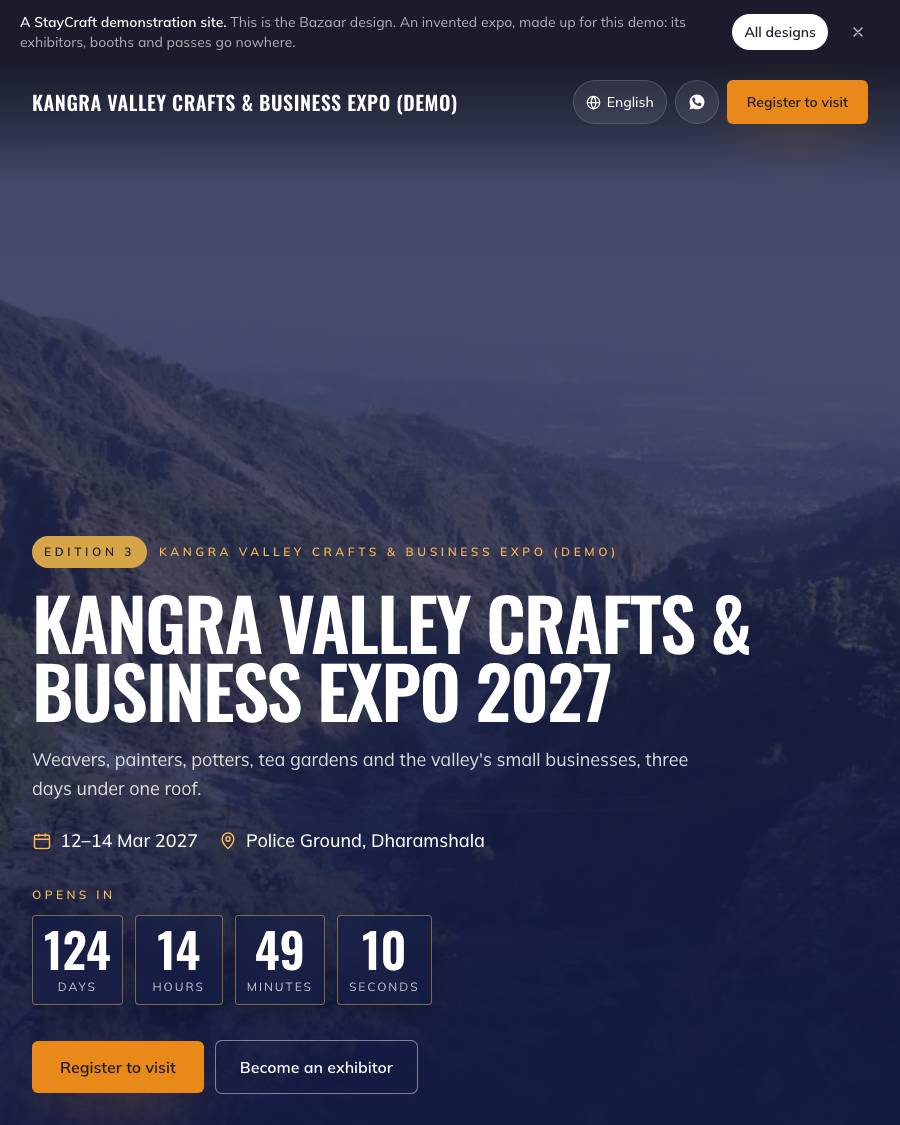
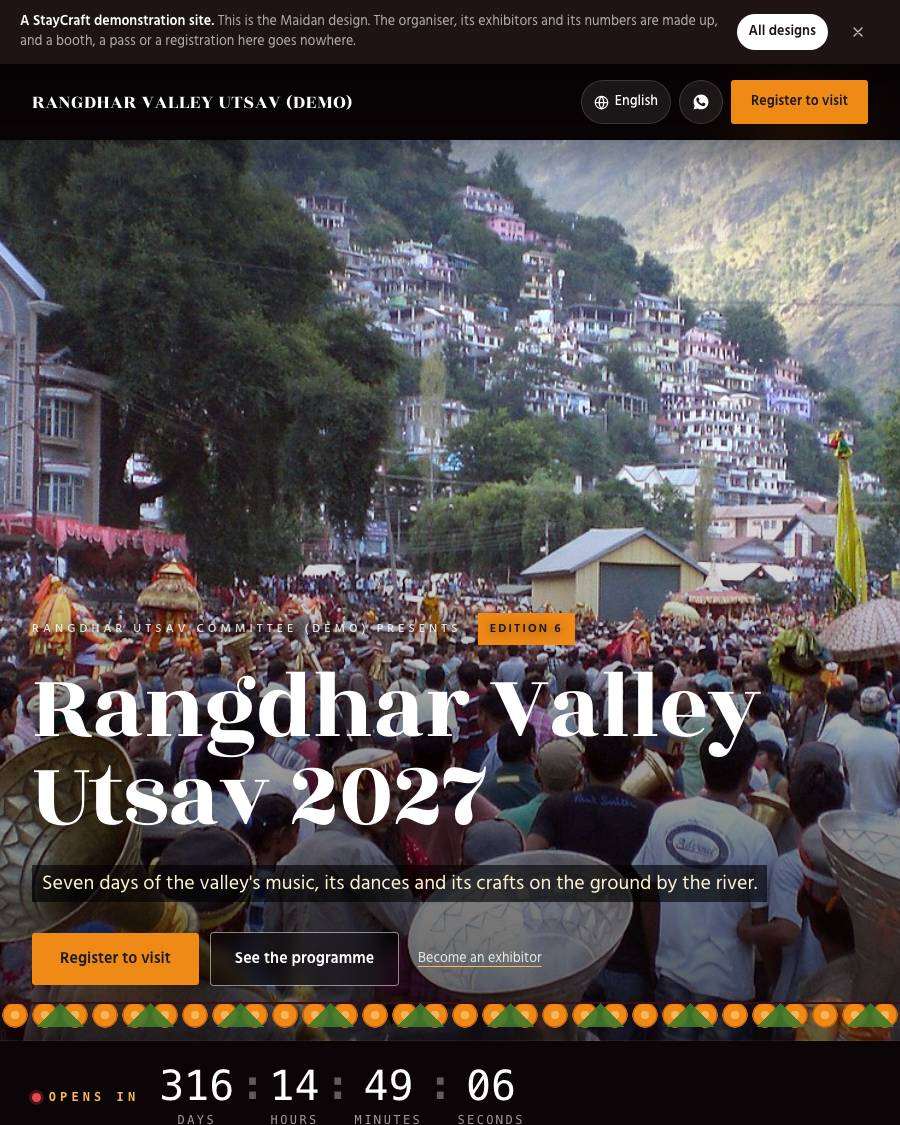
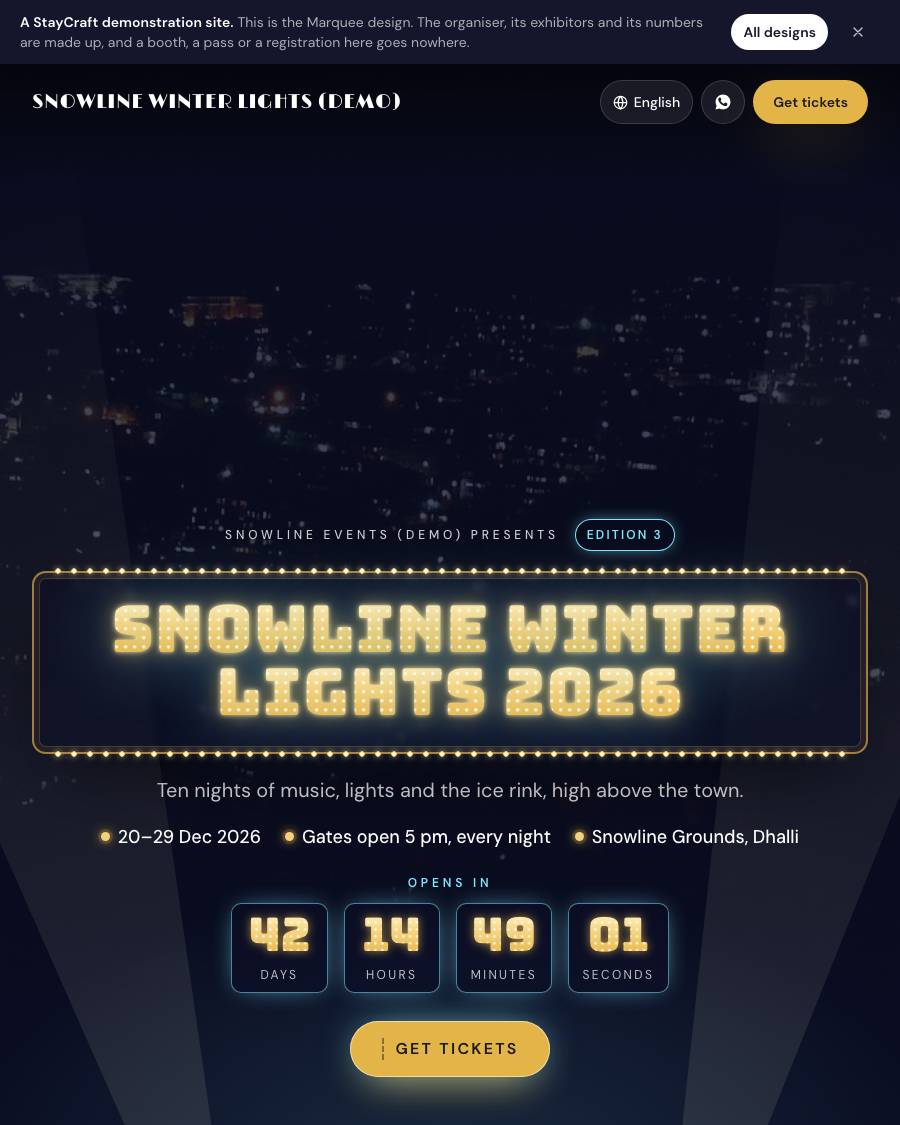
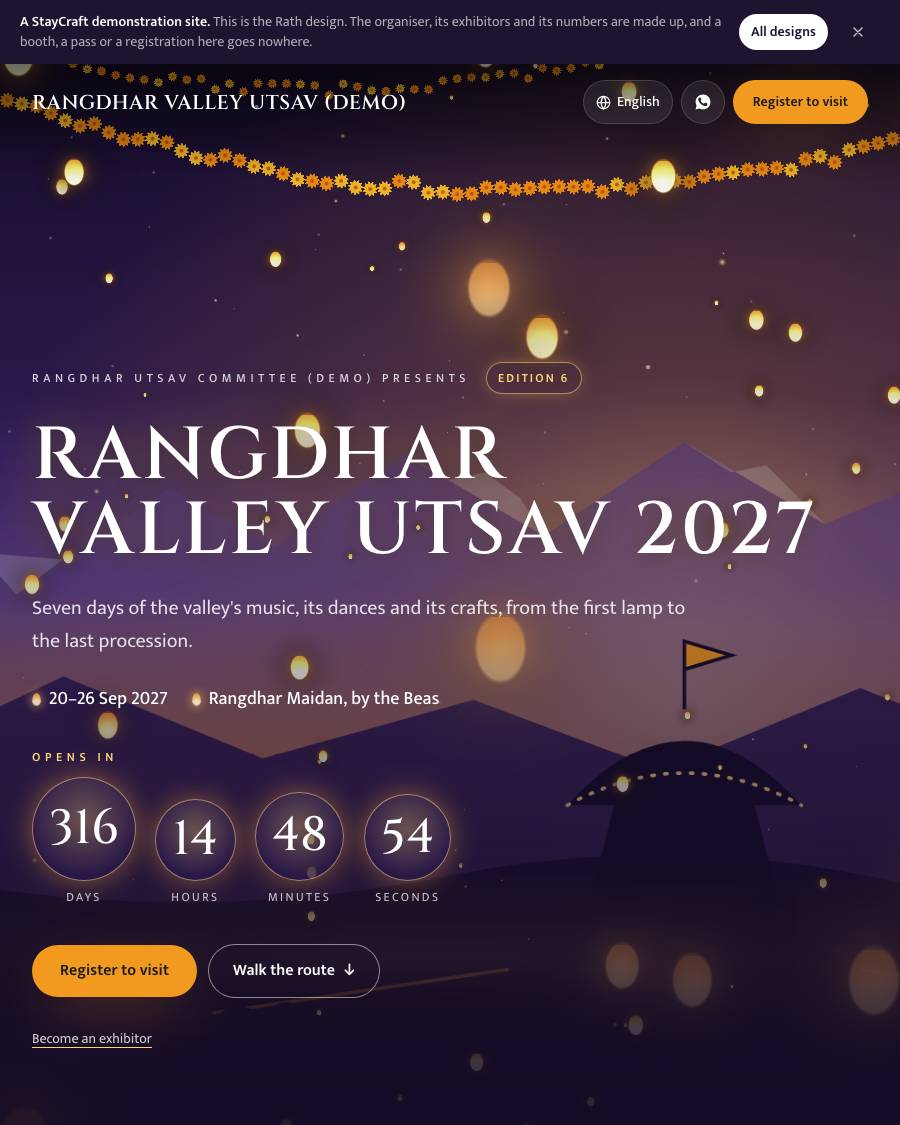
  • Your own website at yourname.staycraft.co.in, with this edition's dates, venue and a countdown. The Bazaar design: an Indian bazaar and an expo's pavilions, in saffron, indigo and brass, with a countdown to your opening, "Happening now: Day 2 of 3" during it, and two calls, Become an exhibitor and Register to visit. A festival opens on Maidan instead: saffron, maroon and Himalayan blue, opening like a documentary, its name in a tall serif over the procession between black bars and the countdown as a timecode. A single event opens on Marquee: midnight and gold, its name in light bulbs that switch on letter by letter, one "Get tickets" button and tickets that tear off a stub. On Pro, the premium Rath: lanterns drifting in 3D at dusk and the programme as a procession route
  • EditionsEach year's (or each chapter's) name, number, dates and venue. One is current; past editions are kept as your...
  • Events and activitiesWith registration, a QR ticket and check-in at the door (the same engine NGOs use), on the plans that carry re...
  • Updates, a photo gallery and messages from your site's form, with follow-ups
  • A WhatsApp buttonWith openers in your own words: the dates, a booth, a pass.
  • GST invoicesYour GSTIN and business details in Settings, a GST rate and an invoice series for each kind of money (booth re...
  • ReportsFor each edition: booths sold and free by type, money billed, paid and due by stream, passes and gate entries...
  • Money straight to youOnline payments through your own Razorpay, or UPI with a screenshot. StayCraft takes no cut.
  • Listed in the StayCraft travel directoryDuring your edition's dates.
Exhibitors and the directory 7
  • Become an exhibitor A page on your website where a business applies with its name, logo, cover photo, overview, products and services (with a photo and a price range each), its pavilion and categories, city and state, website and social links, an optional GSTIN and up to three documents (brochures, licences). They agree to your own terms (written in Settings) and the privacy notice; both are recorded with the date. A hidden trap field and a rate limit keep bots out.
  • You decide An email and an owner-app alert for each application; approve or decline from the Applications inbox, one at a time or ticked together, with an optional note that is emailed to them. Nothing is public until you approve it. Close applications with one switch.
  • Pavilions and categories The top level of your directory (Handicrafts, Food and organic, Hospitality products, Travel and adventure, SHGs and artisans, Government and finance, Automobile, Real estate…), each with a pitch, a colour and the categories under it. Every pavilion has its own page with its exhibitors and an "Exhibit in this pavilion" button.
  • The directory Search by name or product, filter by pavilion, category and city; a card per exhibitor with its logo (or a monogram), pavilion and booth number once booths are given; a page per exhibitor with its overview, products, contacts and a photo or reel. Only the current edition's approved exhibitors are listed. Feature a few for your website's spotlight.
  • Safe contacts by default The business phone and email show while the exhibitor leaves the box ticked; the contact person's mobile shows only if they tick it; their name and email never show. GSTINs are encrypted and masked in lists.
  • No passwords An exhibitor changes their own profile through a private link we email them (14 days; they can ask for a new one). Their changes go live at once, or wait for you if you switch on "Look at profile changes first".
  • Your records A CSV of every exhibitor with contacts and GSTIN, for you only. A declined or withdrawn exhibitor's contact person is cleared after 12 months, as your other records are; a listed business stays.
Booths and booth booking 8
  • Booth types For each edition: "Shell scheme 3x3 m", "Premium corner", "Food stall", with the size, what each comes with and the price before GST.
  • Booths Number, hall or zone, type, size, its own price if it differs. Add a whole row at once ("A-01 to A-40"). Keep a booth off sale (a pillar, your help desk).
  • Venue map Upload each hall's plan (JPG or PNG) and drag a box over each booth; "Copy this box" repeats a row. On your website the plan shows every booth coloured free, held or booked. Tap a booth for its type, size, price and, once booked, the exhibitor's name (approved exhibitors only). Zoom and pan on a phone. A list sits beside it, so the map is never required.
  • Two ways to take a booth, chosen per edition: exhibitors apply, you approve, they pay (you send a link to choose a booth, or assign one), or they pick a free booth on the map and pay at once. After a pick and pay you still approve the exhibitor before their name shows (a switch)
  • Holds An unpaid booth is held for the hours you set (48 by default), then freed by itself and the exhibitor told. A booth is never sold twice. With pick and pay, one open hold a person (email, phone or connection) by default, and a picked booth nobody starts paying for is freed after 2 hours; both are edition settings.
  • Payment straight to you Your own Razorpay, or a UPI screenshot you approve, or cash or a transfer you record. A booth type can take an advance first. Money that lands on a booth taken meanwhile is recorded and flagged for you to return; refunds are yours to make and record.
  • GST tax invoice For booth rent once a booth is booked, numbered EX/26-27/0001 by financial year: CGST and SGST when the venue is in your state, IGST when it is in another (the place of supply is the venue's state, printed on the invoice; set it on the edition), the exhibitor's GSTIN when given, a PDF by email and a page anyone can check it on. No GSTIN saved: a plain receipt.
  • Booth sales Booths sold, held and free by hall and type, booth rent before GST and the GST on it, with a CSV, and the figures on your dashboard.
Your website: Bazaar 9
  • The first screen Your edition's number ("Edition 3"), its name, dates and venue over your photo or video, a countdown to the first day that ticks and flips, then "Happening now: Day 2 of 3" during it and "See you next year" after. You can hide the countdown.
  • Two calls everywhere Register to visit (in the header and the phone's bar) and Become an exhibitor.
  • Partners and sponsors *(Festival plan and above)*: title partner, supported by, channel partners and partners, each with a logo, or their initials until you add one. Rename a tier ("Powered by"), or keep a partner to one edition.
  • About and highlights, with the venue and a map link; Why exhibit and Why attend, each with its own button
  • Pavilions, the exhibitor spotlight, the booths and the venue map, and visitor passes show inside your site as soon as those parts are switched on. Under the hall maps the full booth list folds to one line a hall (how many booths, how many free), opened with a tap; the Booths page keeps it open. On a laptop the pass cards stay in view beside the form
  • Your editions as a timeline Each with its number, dates and a line of your own; every past edition has its own archive page, so last year's never passes for this year's.
  • Plan your visit (getting here, getting around, where to stay), your questions (from Settings), news, the gallery and a contact form that lands in Messages
  • In 8 languages for visitors; motion is gentle and stops for anyone who asks their phone for less
  • Its own touches As on every festival design: the contact form is styled the design's own way, and a small hand-drawn mark of the design's own (a stall here, a canopy on Maidan, a light bulb on Marquee, a chariot wheel on Rath) sits between the sections and draws itself in as a visitor scrolls.
Your website: Maidan, for a festival 7
  • The festival preset's own design. A site set up as a festival opens on Maidan; an expo opens on Bazaar and a single event on Marquee. Any of them can be chosen by any organiser under Design
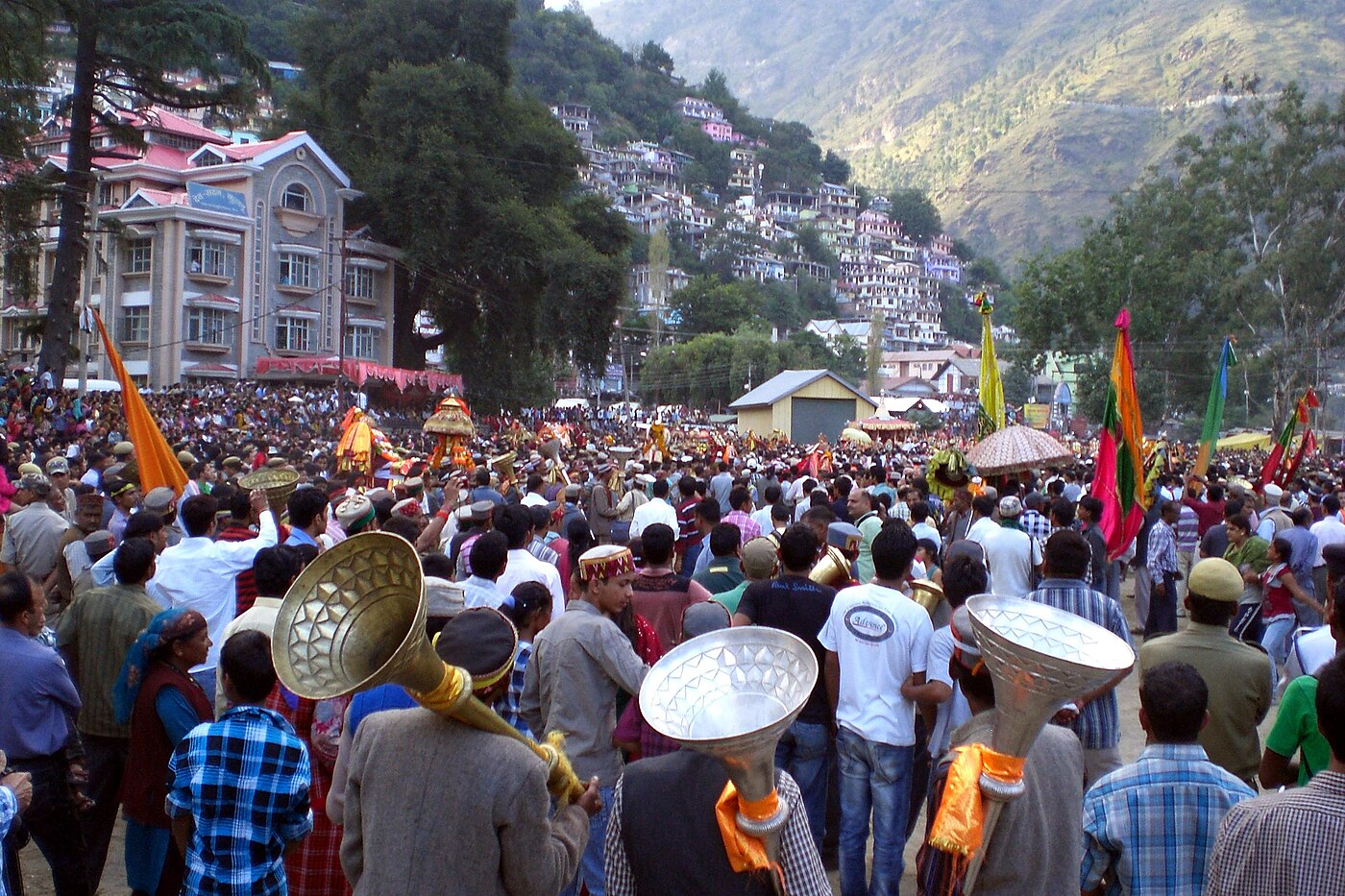
  • The first screen is a film's opening titles: black bars above and below, your photo or video of the procession in its own colours between them, "*your committee* presents", the edition's number, the festival's name in a tall serif and your tagline as a subtitle. The lower bar carries the countdown as a timecode with a red light, and the dates and the ground beside it as a caption. While it runs it says "Day 3 of 7" with a bead for each day; after it, "See you next year". You can hide the countdown
  • Saffron, maroon and Himalayan blue on paper white A marigold garland closing the first screen, each section numbered like a film's chapters. Motion stops for anyone who asks their phone for less, and everything is there without it.
  • Happening now, the programme and your headliners and VIPs Show in their own sections once the programme is switched on: what is on each stage now and next during your dates, the programme day by day and stage by stage, framed as a festival poster that turns its page when the day changes.
  • Who is coming Billed like a film's cast: the role in small capitals and the name large; a photo only where you added one.
  • The crafts fair Your first exhibitors with a way to all of them, and the map of the fair ground.
  • Your events and tickets, passes, partners and sponsors, editions so far, news, gallery, how to reach the ground, questions and a contact form, as on Bazaar
Your website: Marquee, for an event 7
  • The event preset's own design. A site set up as a single event opens on Marquee; it is on every plan, the Event plan too. Any organiser can choose it under Design
  • The first screen is a theatre's marquee at night: your night photo or video full bleed, two searchlights sweeping over it, "*your company* presents", the edition's number and your event's name in light-bulb letters that switch on one by one, then shimmer, the bulbs set in a solid gold face so the name and the countdown read from far off. Under it the dates, your times ("Gates open 5 pm, every night") and the venue, and a countdown lit like the name; "Day 3 of 10" while it runs, "See you next year" after. One button: Get tickets. You can hide the countdown
  • Midnight and gold, with one neon colour you pick In the first section's settings: ice blue (the default), pink, violet, lime or coral. It glows around your name, on the tickets and on the marks.
  • Tickets that tear Each pass is a ticket with a perforated stub and its price; tapping it tears the stub off and picks that pass in the form beside it. Without a script, each ticket simply opens its pass's page.
  • Your headliners and VIPs on the bill, the programme night by night, what is on now during your dates, your photographs, how to get there, your questions, partners, past editions and a contact form. Past editions also have a page of their own, /editions, which never lists the current one
  • The Event plan's admin shows only what the plan carries: no exhibitors, booths or sponsors until a plan with them
  • In 8 languages for visitors; motion stops for anyone who asks their phone for less, and every bulb is lit without it
Your website: Rath, the premium design 5
  • The first screen is a film's opening Paper lanterns and marigold strings drifting in depth over your festival ground at dusk, drawn live in 3D, with your festival's name rising through them, "*your committee* presents", the edition's number, the dates and the ground, and a countdown lit like lamps; "Day 3 of 7" with a diya for each day while it runs. Scroll, and the camera moves forward through the lanterns. Over your own photo if you upload one, else the ground drawn at dusk with its hills, deodars, a temple and a rath.
  • Dusk violet, marigold and lamp glow A string of marigolds under every heading. Your own colours work on it too.
  • The programme as the procession route Each day of your programme a stop on the way ("Stop 1 · Day 1 of 7"), with that day's programme and "Add to calendar"; a lamp travels the road as visitors scroll and lights each stop it reaches; today's stop is marked.
  • Never in the way: every word is real text over the scene. The 3D runs only on phones and computers that draw it smoothly and pauses off screen; anyone who asks for less motion, saves data, is on a slow phone or prints the page sees the same lanterns still. Keep the first screen still shows the still to everyone
  • Happening now, your headliners and VIPs, events, passes, the crafts fair, partners, editions, news, the gallery, how to reach the ground, questions and a contact form, as on Maidan
Visitors, passes and the gate 7
  • Pass types for each edition A free visitor registration (most trade expos), a paid day pass, a several-day or season pass, a trade visitor pass (company name, GSTIN optional) and a student or concession pass. Each has a price (0 is free), the days it is good for, places a day and dates it is on sale.
  • Registration on your website At /register and on your home page: the visitor picks the pass, the days and how many people. A free pass with its QR code comes at once, on the page and by email, with the days as a calendar file. On a phone the pass shows big for the gate.
  • Paid passes through your own Razorpay, or by UPI with a screenshot you approve. A paid pass gets a GST tax invoice when your GSTIN is saved, else a plain receipt, numbered in your tickets series; a pass's receipt has its own series (TKR)
  • The gate, even offline Each gate phone keeps the day's list (pass codes as one-way hashes, initials and pass type only, never a phone or email), scans with the camera or a typed code, and records each entry with the time and the phone. With no network it goes on scanning and syncs when the network is back. A pass scanned twice on a day says when it first came in; two phones that let the same pass in are listed for your gate lead. The gate phone works out today on the edition's clock: holding another day's list, it shows a red banner and admits nobody offline, and a sync never lets in a pass cancelled, unpaid or not for that day.
  • Gate logins A staff login with the Gate role sees the Gate screen and nothing else.
  • B2B meeting requests (Expo and above): a trade visitor (or anyone, your choice) asks an exhibitor for a meeting on a day and time slot (20 minutes by default). The exhibitor accepts or declines from their email, no account needed; both are told; you see every request.
  • Your screens Passes with filters and a CSV, resend a pass, approve a screenshot, the entries report by day, hour and pass type, and on your dashboard who registered and who entered today.
Programme, people and "On now" 8
  • Stages for each edition Main stage, Kala Kendra, the demo corner, in your order.
  • The programme builder Each slot on a day, a stage, from a time to a time (late nights past midnight too), with a title, a short text, a photo and who is on. Drafts stay off your site until you switch them on.
  • A clash warning Two slots that overlap on one stage are flagged as you type, on the list and on the grid. You can still save it (a hand-over is fine).
  • The programme grid: a day at a time, a column for each stage. Copy a day repeats a day's slots on another day, as drafts unless you choose otherwise
  • People: chief guests, guests of honour, performers, judges and speakers, each with the days they are there, a line under the name, a photo (or their initials), a short bio, and featured for your headliners
  • On your website At /programme: a tab for each day, a column for each stage on a big screen, one list in time order on a phone. Each slot can be added to a visitor's calendar.
  • On now and next up During your dates, on your edition's own clock; nothing shows before or after.
  • Never stale Only the current edition's programme is shown, and only once the edition is published. Past programmes are never shown as this year's.

Plans and prices

Priced per year, no commission

We agree the plan with you before anything goes live. No card up front: you pay by UPI or bank transfer, and every booking's money is yours.

Event ₹7,500/yr

Everything in "What every site gets"; tickets with a QR code and check-in at the gate; visitor passes and offline gate scanning; 2 logins besides the owner.

₹625 a month, billed yearly

Festival ₹24,000/yr

Exhibitors, booths off a map, sponsors

₹2,000 a month, billed yearly

Pro ₹48,000/yr

Premium designs, your own domain, 8 languages

₹4,000 a month, billed yearly

Compare every plan, line by line

Designs

4 designs made for this

Pick one when you start, and switch whenever you like. Changing the design never touches your exhibitors, your booths or your invoices.
Events, festivals & expos

Tell us about your event

What it is, where, when, and how exhibitors and visitors reach you today. We will say which plan fits and what it costs.

WhatsApp us