Skip to content

Hotels

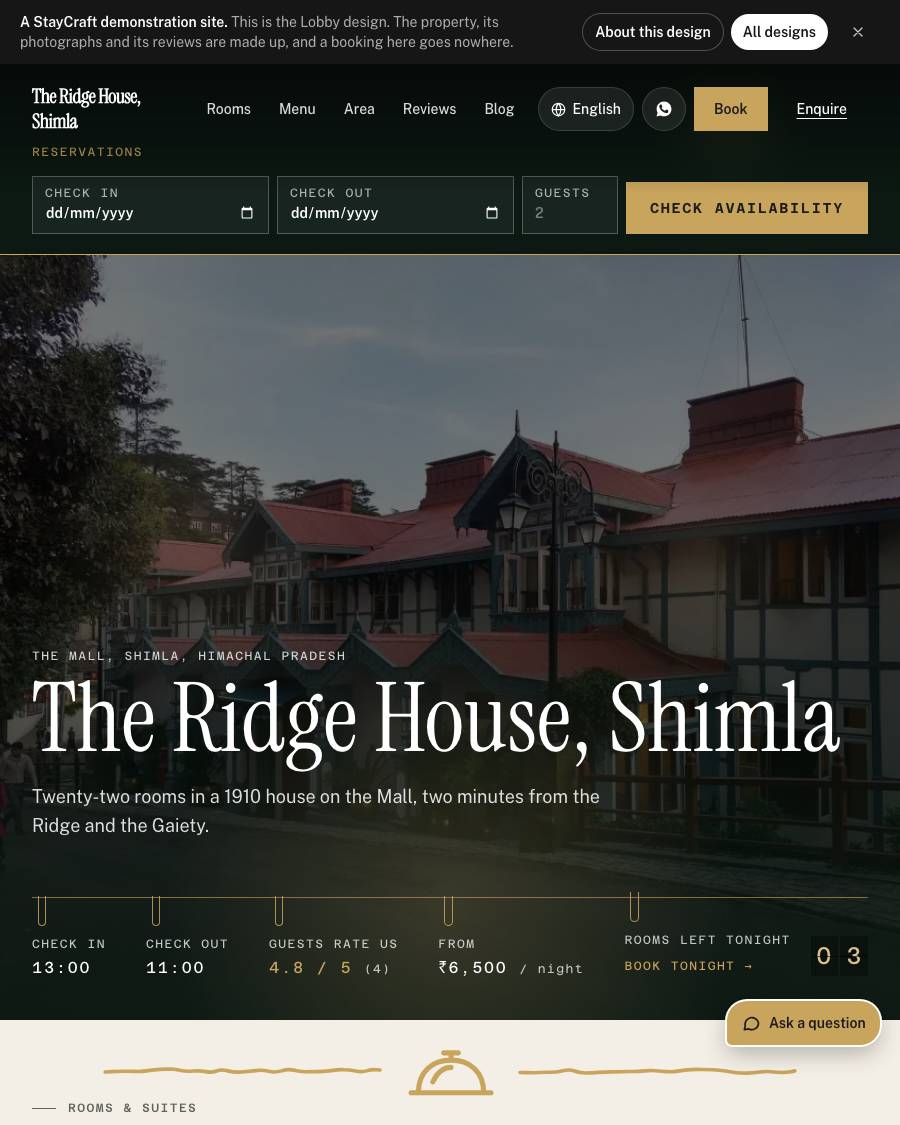
A hotel that looks alive today

Breakfast till half past ten, a film at six, the bonfire at eight, three rooms left tonight. A hotel site should say what is on today, not what was on when the site was built.

Running today in Kullu, Shimla, Mussoorie, Darjeeling, and everywhere else in India.

  • 0% commission
  • 3 designs for it
  • 129 features
  • from ₹9,000 a year

What it does for you

Your week, handled

Today at the hotel, on a board

Lobby shows only today's lines, with the rooms left tonight counted from your bookings.

Pro

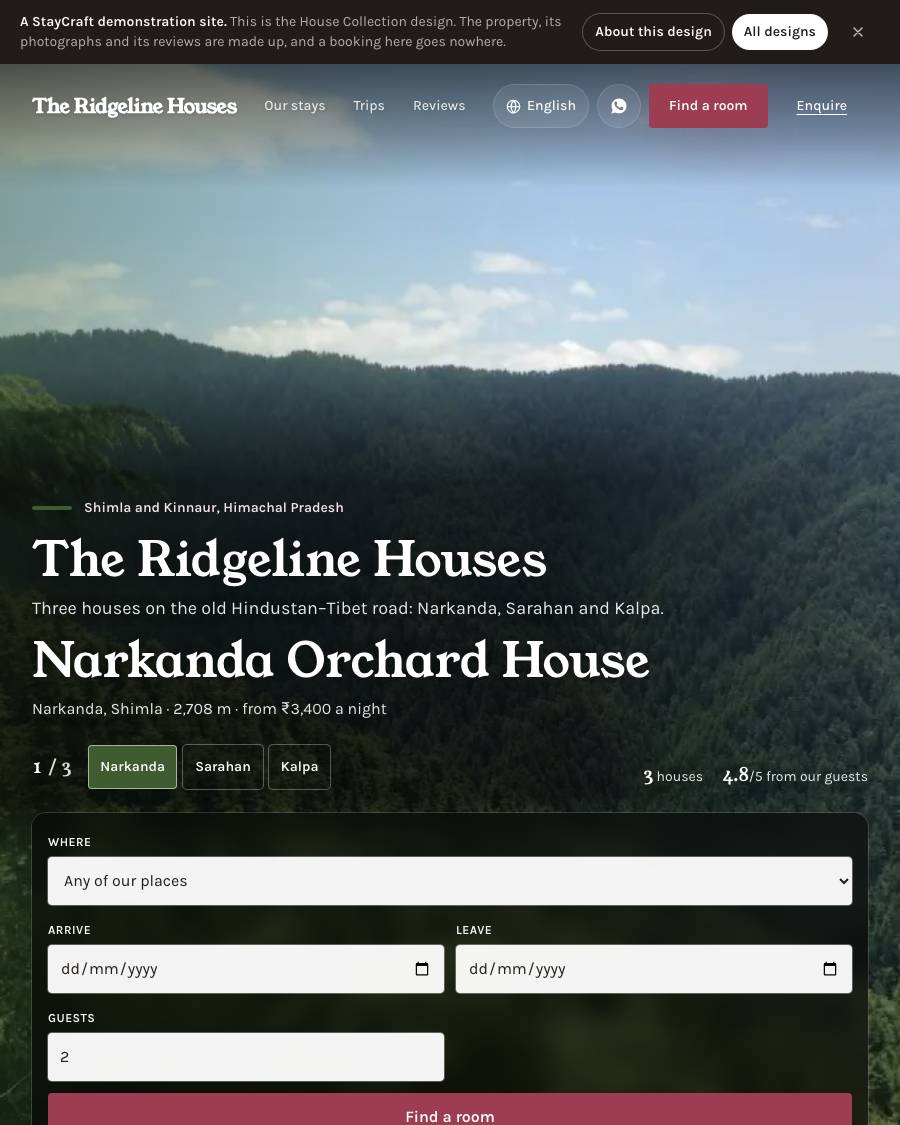
The booking bar as the header

Dates and guests on every screen, and the advance paid before they arrive.

Basic

The restaurant on the same bill

A menu, orders from the room, and everything on one bill at checkout.

Growth

Everything it gets

129 features, all of them

What every site has from the first plan up, then every feature in detail.

Everything it gets 129 features

  • Your own websiteAt yourname.staycraft.co.in, in any of 19 designs made for stays (homestay, heritage, estate, beach, adventure...
  • Your roomsEach with photos, facilities, size, price and how many of that type you have.
  • EnquiriesFrom your website, each saying which room the guest asked about, with a one-tap WhatsApp reply.
  • Enquiry follow-upEvery enquiry moves through New, Replied, Quoted, Won or Lost, with a day to follow up on and a note to yourse...
  • Won enquiry to booking (Basic and above): mark an enquiry Won and Make the booking opens the Room chart's Reservation already filled in with the guest, dates, guests, room and their message. You check it and press Reserve; the enquiry then shows "Booked as #123". On the Website plan, Copy details instead
  • A WhatsApp buttonOn every page of your site.
  • A question buttonOn your home and room pages (on Team and Pro it also has an AI helper box, see Plans): visitors tap Rooms and...
  • Photo gallery with albums, Nearby places, and Guest reviews on your site
  • Availability calendarTo block dates you have sold another way.
  • Blog and SEO & Google tools, with a health score and a checklist
  • Guest register and Form CFor foreign guests, kept digitally.
  • Review cards and QR landing pagesTo print and stand on a table.
  • VisitorsPage: traffic, top pages and where your enquiries came from.
  • Monthly report by emailOn the 1st, last month's visits, enquiries and (where your plan has them) bookings, payments, QR scans, review...
  • Backup & RestoreDownload your whole site as a zip at any time.
  • Phone notificationsFor new bookings and enquiries.
  • At least one staff login(Website 1, Basic 3, Growth 5, Pro 10; the owners are not counted).
Website & design 14
  • 14 stay designs Aurora, Heritage, Timber, Alpine, Summit, Serene, Orchard, Dune, Linen, Plantation, Coast, Haveli, Bunk and Basecamp. They are different layouts, not one page in different colours. Switching design never loses anything the owner has written or uploaded. All of them can be seen with a real site running at staycraft.co.in/designs.
  • Five premium designs Each made for one kind of place, included on Pro and quoted on any other plan:
  • A bolder lower half Below the rooms, packages fill the screen one at a time with their own photo, name and price, things to do are numbered lines with the price on the right, reviews show one guest at a time as a large quote, and the booking form sits over a slowly moving photo of the place. In each design's own colours and fonts.
  • Each design's own touches The Ask a question button (bottom right) and the Write to us form are styled to suit the design, a small hand-drawn mark of the design's own sits between the sections, and the facility icons are drawn in the design's own hand (a pen line, a stamp, a hairline, a bold mark or a soft glow).
  • Motion in every design The first screen opens like a film shot and headings and photos move as a visitor scrolls. Visitors whose phone asks for less motion, or who are saving data, get a still page and download nothing extra.
  • Website editor Drag sections into order, hide the ones you do not need, change headings, text and the main photo, with a live preview.
  • Video in the first screen Paste a YouTube, Vimeo or Dailymotion link and the site shows a "Watch the video" button beside the main button, in every design.
  • Your own colours That reach the whole page, and stay readable whatever colour is picked. (Basic and above)
  • Start from a demo Fill a new site from one of six example homestays, then swap in your own words and photos.
  • Good to know Your FAQ and house rules, shown just before the booking form.
  • Restaurant, Bar, Bakery and Adventure & Trekking photos Up to 6 photos and a short note for each, shown in the Area guide section of your site.
  • Facilities From a standard list with icons, including Room heater and Electric blanket.
  • Photos are cleaned on upload The phone's location is removed, sideways photos are turned upright, and iPhone photos work as they are.
  • Your logo In the site header and the browser tab.
Bookings & payments 11
  • Direct bookings with UPI payment proof The guest books on your site, pays the advance to your UPI ID and uploads the screenshot. You check your UPI app and approve. No payment gateway is needed. (Basic and above)
  • Live price on the booking form Seasonal rates, number of rooms and coupons are worked out as the guest fills it in, so the price they see is the price they are charged. (Basic and above)
  • More than one room in a booking And different kinds of room in one booking, paid with one screenshot. (Basic and above)
  • Paid extras A heater, an extra mattress or an electric blanket, priced a night or once for the stay. The guest picks them on the booking form, and each goes on the bill as its own line. (Basic and above)
  • Guest emails Approving a booking emails the guest their confirmation, voucher and invoice. (Basic and above)
  • Cancellations A guest asks from their own booking page and you approve or keep the booking. (Basic and above)
  • Seasonal rates with minimum nights, optionally only on some days of the week (a weekend price), set for several rooms at once, and coupons that count as used only when you approve. (Basic and above)
  • Extra adults and children Set the persons a room's price covers (2 by default), an extra bed price for an adult and for a child, and how many extra of each a room takes. Children up to 4 are free and from 12 count as adults; you can change both. (Basic and above)
  • Meal plans Room Only, Room with Breakfast, Room with Breakfast + Lunch/Dinner (or + Dinner, or + Lunch: the owner names MAP's main meal) and Room with All Meals, each priced per room for 2 persons, with its own price for an extra adult's and an extra child's meals. Guests see every plan as its own row with its own total, and choose Adult or Child for each guest above 2. (Basic and above)
  • Online card and UPI payments Through the owner's own Razorpay account. (Growth and Pro)
  • Packages and experiences Treks, honeymoon stays, food tours, each with a price and photo. (Growth and Pro)
Rooms, calendar & channels 13
  • Room types and counts Add one "Deluxe Room" and say you have five. That number is what the site sells.
  • Availability calendar Click a date to block it. Blocked dates cannot be booked.
  • Block dates from an OTA email Paste a booking email from MakeMyTrip, Goibibo or Airbnb and the dates are read for you to check and block.
  • Room chart Every room down the side, the next weeks across the top, each booking drawn as a bar with the guest's name. Book a walk-in, a group, an enquiry or a blocked room from the same screen, or by clicking an empty night. (Basic and above)
  • Billing accounts A travel agent or company that pays later. Put a guest's bill on their account, the agreed room discount comes off once, and one payment from them is spread over their settled bills. Statement as a spreadsheet.
  • Private feedback first The final-bill email carries a link where the guest gives one to five stars and a note, and you can send the same link on WhatsApp from the settled bill. Everyone then sees your Google review link, whatever they scored. A score of 1 to 3 also asks what went wrong, and you hear it by email and phone ping before it can become a public review. The list is under Front desk, Private feedback, and the dashboard shows the average. (Basic and above)
  • Desk coupons A code made for the front desk, typed on a walk-in, taken off the room charge. Website codes stay website-only.
  • Your own line in the arrival and checkout emails And a copy of each to you. (Basic and above)
  • Housekeeping Rooms that need cleaning appear on their own when a guest leaves, with a Clean button for the cleaner's phone, and a housekeeping login that sees no phone numbers or money. (Basic and above)
  • Reports For arrivals, departures, who is in the house, cancellations, payments by how they were paid, and each room type's nights and average rate, on screen or as a spreadsheet. (Basic and above)
  • Bed board For dormitory rooms sold by the bed. (Basic and above, where you have dorm rooms)
  • Channel sync with Airbnb and Booking.com By calendar link, both ways, checked every hour. It works today but is still marked "Soon" in the admin. (Pro, or as an add-on)
  • "Also bookable on" links To your Booking.com, Airbnb or MakeMyTrip listings, shown small in your footer.
Guests & front desk 7
  • Dashboard Arrivals today, occupancy tonight, this month's bookings, enquiries waiting, a list of what needs attention, and the next 14 nights by room.
  • Guest register Name, address, ID type and only the last four digits of the ID. StayCraft never stores the full ID number or a photo of it.
  • Form C for foreign guests The official form filled in from the bill, ready to print or save as PDF, and a sheet laid out like the FRRO website. A 24-hour clock shows what is due, with an email and phone reminder six hours before.
  • Walk-in check-in That opens the guest's bill at once. (Basic and above)
  • Room assignment and room changes Written on the register so the chart and bill always agree. (Basic and above)
  • Remove a person's details On request, while keeping the register, Form C and bills the law requires.
  • Privacy notice consent Recorded on each booking, enquiry and review.
Bills & GST 4
  • Room bills One bill per stay, opened when you approve a booking or check in a walk-in. Add charges, take payments in cash, UPI or card, and settle. (Basic and above)
  • Invoices Download the bill as a PDF at any time, or email it. The guest is emailed the final paid bill when you settle. (Basic and above)
  • GST tax invoices For a GST-registered owner, every settled bill becomes a numbered tax invoice with your GSTIN. Your prices stay as they are and the tax is worked out inside them: rooms at 12% up to ₹7,500 a night and 18% above, food 5%, activities and other charges 18%. Every rate can be changed. (Basic and above)
  • Company invoices A guest can give a company GSTIN and state, and the invoice shows CGST and SGST, or IGST for another state. (Basic and above)
Menu & food 7
  • Food menu With breakfast, lunch and dinner sections, sizes (Half and Full), and an "On the menu" switch per dish. (Growth and Pro)
  • FSSAI veg and non-veg marks Allergens, spice level, "Chef's special" labels and "Back at 7:30 pm" when a dish runs out. (Growth and Pro)
  • All | Veg | Non-veg switch For guests on the menu. (Growth and Pro)
  • Load the whole menu at once From StayCraft's Excel sheet, from your own sheet or billing software's export as it is, or from photos or a PDF of the printed menu, read for you. A preview of every dish before anything is saved. (Growth and Pro, the owner's login)
  • A menu page for the QR code in the room Which works whether or not your homepage shows the menu. (Growth and Pro)
  • QR ordering One code per room or table. The guest orders from their phone, and nothing is charged until you accept it onto their bill. Guests can also ask for someone to come over, more water or the bill. (Growth and Pro)
  • Kitchen hours And a kitchen ticket to print with no prices on it. (Growth and Pro)
Inventory (Growth and Pro; Team and Pro on the new plans) 9
  • Items, stores and suppliers What you keep (soap, shampoo, linen, kitchen stock), counted in your own unit, bought in cartons if you like; a Main store, one per property in a group, and your own (Kitchen, Bar).
  • Purchase bills Each supplier's invoice with its lines, GST, delivery charges and a photo; payments against it; what you owe each supplier and what is overdue.
  • Edit a bill Correct the supplier, items, quantities, rates or GST later; stock, totals and what you owe follow, and each change is kept.
  • Uses with where they went A room, a common area, the kitchen, a staff meal, an event; and waste with its reason.
  • Transfers and counts Move stock between stores; count a store and the books are corrected, with who counted.
  • Cost and value Each item at its average cost before GST; what is in stock is worth; low-stock alerts once a day.
  • History Every entry with who made it, never edited.
  • Linen and laundry Towels and sheets shown on the shelf, in the rooms and at the laundry; send a batch to your own laundry or a laundry supplier and count it back; what did not come back is recorded as lost by that laundry; a supplier's rate per piece, per kg or per batch makes its bill.
  • Accounts: expenses with receipts (salaries, power, rent, repairs), rent and salaries made every month, other income, and a profit and loss each month: what your bills charged before GST, less the stock used or lost at cost, less expenses. Also cost per room night sold, trends, suppliers, laundry losses and GST on purchases, each as a CSV
Staff & roles 6
  • Front desk Bookings, enquiries, check-in, payments, room bills, guest register and Form C. No settings, takings, website or exports.
  • Housekeeping One screen, Today, with who arrives and who leaves and which room. No phone numbers, emails or amounts. (Basic and above) With Inventory, also what was used in a room or wasted, and linen to the laundry and back.
  • Kitchen Food orders to make, the ticket to print, and Sold out / Back on. No prices or bills. (Growth and Pro) With Inventory, also what the kitchen used or wasted.
  • Store keeper (with Inventory): purchase bills (without prices; the owner adds them), uses, transfers, counts and the laundry. Never a price, a total, what is owed or Accounts.
  • A second owner Can be invited and is not counted against the limit.
  • Staff logins per plan Website 1, Basic 3, Growth 5, Pro 10. Each person sets their own password. Switch a login off when someone leaves and nothing they did is lost.
Marketing & Google 11
  • SEO health score With a checklist that links to the screen where each item is done.
  • Local details and map Your coordinates drive the "Find us" map. Google is told your address, check-in times and room sizes.
  • Area guide, How to reach (air, train, bus, road) and Best time to visit The pages that rank for searches about your valley.
  • Sitemap sent to Google every week And a weekly phone speed score for your home page.
  • Ask for Google reviews Save your Google Place ID once and get a printable code, the link, and a ready WhatsApp message.
  • Review cards Design a table tent, counter card, A5 card or A4 poster with your photo and a QR code, printed to the millimetre, or shared as an image on WhatsApp.
  • Social posts One tap turns a room, a guest review, a coupon, a nearby place, a package or a festival into a picture (1080 × 1350 post, 1080 × 1920 story or WhatsApp status, 1080 × 1080 square) with your brand colour, your site's fonts, your photo and a "Book direct" line with your address. A caption comes with it, in English or Hindi, with hashtags built from your town, state and kind of stay, which you can edit. Download the picture, copy the caption, or on a phone share it straight to WhatsApp status. A "Coming up" strip lists the next three festivals (Diwali, Holi, Kullu Dussehra, Losar and others). Nothing is posted to Instagram for you.
  • QR landing pages One printed code that opens a page of buttons you choose (review us, WhatsApp, book direct, see the menu, Instagram and more). Change the buttons any time without reprinting. Scans are counted.
  • Where enquiries come from Each enquiry and booking request is credited to the search or post that first brought the visitor.
  • Search insights What people typed into Google to find you, clicks, impressions and position, 16 months of it, updated daily. (Growth and Pro)
  • Google Analytics With a cookie question for visitors, if the owner adds an Analytics ID.
Offers to past guests (Growth and above) 7
  • A "Send me offers and updates" tick box On your booking form, your enquiry form and the desk's check-in. It is off until the guest ticks it, it is its own box (not part of agreeing to the privacy policy), and we keep the time and the exact words the guest saw. At the desk you tick it only for a guest who says yes when you ask.
  • Send an offer To the guests who agreed: pick a message (a festival greeting, come back for a stay, a lean-season offer, a new room or package), in English or Hindi, and change the words to your own. Choose who it is for: guests who stayed in the last 3, 6 or 12 months, who stayed two or three times, or who are from one state. You see how many it will reach before anything goes, preview the email, and send it now or for later.
  • A coupon in every offer Attach one of your coupons (or make one while you write), and the code goes in the email and in the WhatsApp message.
  • Sent from StayCraft's mail address, replies to you Every email has a one-tap unsubscribe link. A guest who unsubscribes is never written to again, and you can stop offers to any guest yourself.
  • Send on WhatsApp A list of the guests with a phone number, each with a tap-to-send link that opens WhatsApp with the message and code already written. A guest is marked sent when you tap. There is no WhatsApp Business account to set up and no per-message cost.
  • What it brought For each offer, how many were emailed, skipped and unsubscribed, and how many bookings used the coupon and what they came to.
  • Fair to your guests Nobody gets more than one offer in 30 days, and each plan has a monthly allowance of offer emails (Growth 200, Plus 400, Team 800, Pro 1,500; WhatsApp taps are not counted).
Reports 4
  • Guest register download For any period, as a spreadsheet.
  • Form C sheet download For foreign guests.
  • Visitors Traffic, top pages and sources.
  • Booking list download For the owner.
Phone app & notifications 5
  • Pings on your phone For a new booking, a new enquiry, Form C reminders and food orders. Tap one and that record opens.
  • Works on Android phones and on Windows or Mac computers through the browser. On iPhone it works through Safari with a StayCraft icon added to the home screen
  • A ping can show a guest's name, never their phone number, email or an amount
  • Each staff login gets pings only for what their own screens show
  • A StayCraft app for Android is being tested and is not yet available to everyone
Languages 1
  • Your site in 8 languages English, Hindi, French, German, Spanish, Italian, Russian and Hebrew (right to left), with a one-tap switch. The whole guest journey is translated: rooms, the booking form, invoices, vouchers and reviews. Nothing for the owner to translate. (Pro, or as an add-on)
Your own domain 1
  • Use your own domain (for example yourstay.com). We send the records to add at your domain company and set up HTTPS for you. The staycraft.co.in address keeps working too. (Pro, or as an add-on)
Security & backups 6
  • Backup A zip of your rooms, photos, packages, reviews, blog, menu, rates, settings and design, plus your bookings, guests, bills and enquiries. Payment keys are never in it.
  • Restore Puts your site back and never overwrites bookings or bills taken since.
  • Sign-in email changes Are confirmed by a link sent to the new address.
  • Changing your password Removes all your devices from phone pings, useful if a phone is lost.
  • Site visibility Take your site offline yourself with "Coming soon", "Making edits" or "Not yet live", and put it back when ready.
  • Grievance officer Name and email in your site's footer, if you sell online.
Several properties (hotel groups) 6
  • One website and one admin for two to five hotels or homestays Each property has its own page, rooms, photos, Google listing, bookings and bills; the group shares the brand, the domain, the enquiry inbox and the reports.
  • A switcher in the admin Shows one property at a time, or all of them together.
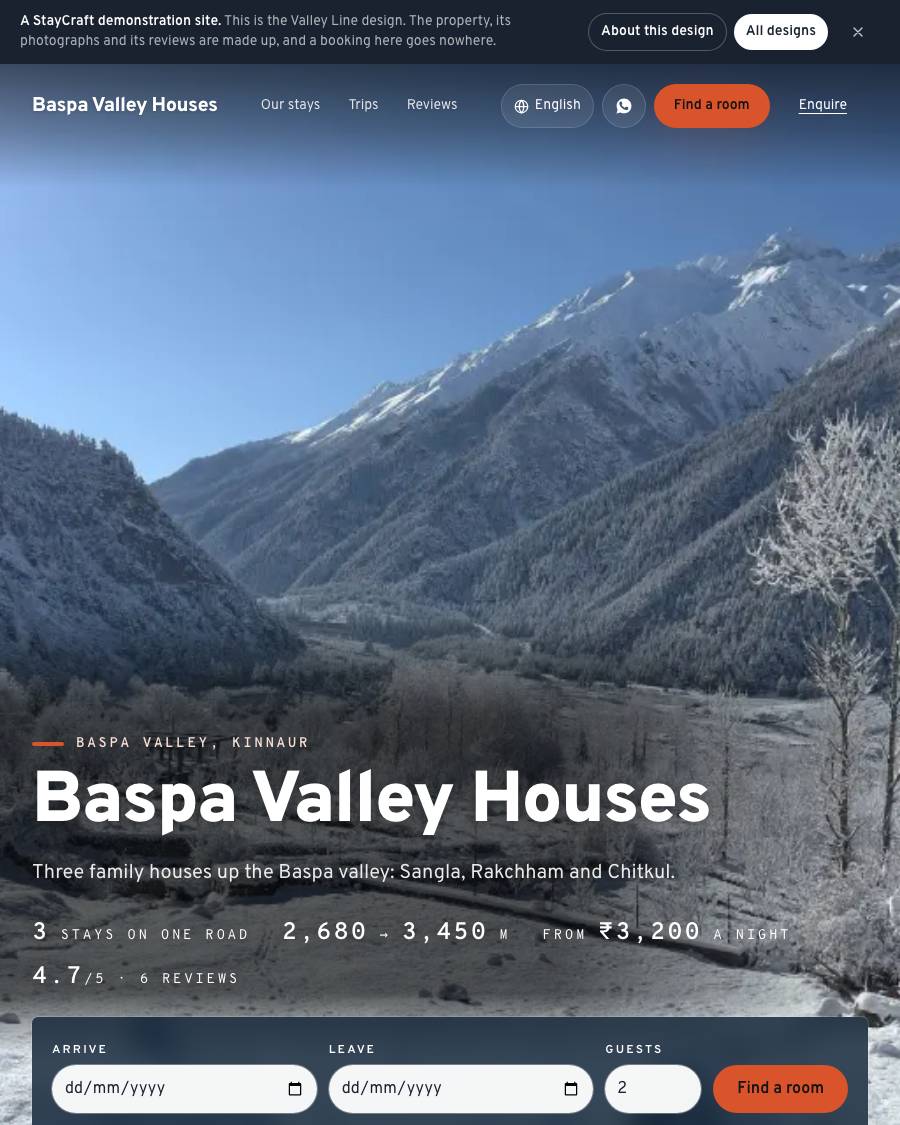
  • Trips across your properties Such as 1 night in Sangla, 1 in Rakchham and 1 in Chitkul, booked and paid online in one go. Every stop is checked together and confirmed together. An optional discount for staying at more than one.
  • Payments and GST your way One set of details for the group, or each property its own UPI, GSTIN (or not registered) and bill numbers. With each property paid for itself, a guest pays a trip in one payment per property, each straight to that property.
  • Staff given some of your properties Enquiries tagged by property, and a report with your properties side by side.
  • Any plan includes one property. Each extra property is a fixed price a year: ask us

Plans and prices

Priced per year, no commission

We agree the plan with you before anything goes live. No card up front: you pay by UPI or bank transfer, and every booking's money is yours.

Website ₹9,000/yr

A small homestay taking enquiries

  • The website
  • Rooms
  • Enquiries
  • WhatsApp button
  • Gallery
11 moreShow fewer
  • Nearby places
  • Reviews
  • Availability calendar
  • Blog
  • SEO
  • Guest register and Form C
  • No staff logins
  • 1 management user (you)
  • Three designs made for your kind
  • 1 design change a year
  • 1 GB

₹750 a month, billed yearly

Basic ₹12,000/yr

A guesthouse or hostel taking direct bookings

Everything in Website, and

  • Online booking with UPI payment proof
  • With it the whole front desk: room bills
  • GST invoices
  • Room chart
  • Seasonal rates
9 moreShow fewer
  • Coupons
  • Paid extras
  • Bed board
  • Your own colours
  • 3 staff logins
  • 2 management users
  • Every standard design
  • 2 design changes a year
  • 2 GB

₹1,000 a month, billed yearly

Plus ₹18,000/yr

Foreign guests, your own domain and OTA calendars

Everything in Growth, and

  • Your site in 8 languages
  • Your own domain
  • Calendar sync with Airbnb and Booking.com
  • 400 offer emails a month
  • 8 staff logins
3 moreShow fewer
  • 2 management users
  • 3 design changes a year
  • 5 GB

₹1,500 a month, billed yearly

Team ₹25,000/yr

A bigger property run by a team of managers

Everything in Plus, and

  • Inventory: purchases
  • Stores
  • What is used
  • Laundry
  • Expenses and a monthly profit and loss
6 moreShow fewer
  • 800 offer emails a month
  • An AI helper on your website that answers visitors' questions (300 answers a month)
  • 10 staff logins
  • 3 management users
  • 4 design changes a year
  • 10 GB

₹2,083 a month, billed yearly

Pro ₹30,000/yr

A resort or boutique hotel that wants the best of it

Everything in Team, and

  • Alerts on your phone for every new booking and enquiry
  • The premium designs
  • Change your design any time
  • 1
  • 500 offer emails a month
3 moreShow fewer
  • 20 staff logins
  • 5 management users
  • 25 GB

₹2,500 a month, billed yearly

Compare every plan, line by line

Designs

3 designs made for this

Pick one when you start, and switch whenever you like. Changing the design never touches your rooms, your photos or your bookings.
Hotels

Tell us about your place

How many rooms, where you are, and what you sell besides the bed. We will say which plan fits and what it costs.

WhatsApp us