Skip to content

NGOs & communities

Your cause on its own website, with gifts and receipts that add up

A supporter wants to know what you do, see that the money reaches the work, and get a receipt they can use. You want gifts recorded the day they arrive and receipts that do not take an evening to write.

Made for NGOs, trusts, self help groups, clubs, residents' associations, and temples and religious trusts in Himachal and across India.

  • 0% commission
  • 6 designs for it
  • 131 features
  • from ₹1,200 a year

What it does for you

Your week, handled

Your work, told well

Your mission, your programmes and your updates on a site of your own, found on Google and easy to share on WhatsApp.

Every plan

Gifts by UPI, with a receipt

A supporter pays you by UPI and sends the proof; you approve it in one tap and a numbered receipt goes back to them.

Website

Your events, listed

Camps, drives and meetings with the date, the place and how to take part.

Website

Everything it gets

131 features, all of them

What every site has from the first plan up, then every feature in detail.

Everything it gets 131 features

  • Your own website at yourname.staycraft.co.in, on the Lantern design: your mission, your numbers, your programmes, your committee, your updates and a Donate button on every screen
  • Your documents, open to allRegistration and 80G certificates, annual reports and audited accounts as PDFs anyone can download, each shown...
  • A volunteer formPeople who want to help arrive under Messages, marked as volunteers (on Growth and above, as volunteers with t...
  • UpdatesPosts on your site, found on Google and easy to share on WhatsApp.
  • A photo gallery
  • MessagesFrom your site's form reach your admin and your email, with follow-ups.
  • A WhatsApp buttonWith openers in your own words: how to help, how to give, an event.
  • Gifts by UPI with a receiptA supporter gives on your website by UPI and uploads the screenshot, you approve it in one tap, and a numbered...
  • Events listedDate, place, a map and a calendar link; the next three on your home page, past ones kept.
  • Your registrations in SettingsType of organisation, registered name, registration number, PAN, 80G number and validity, 12A, CSR-1, NGO Darp...
  • Social postsAn update or an event as a finished picture and caption, shared to your WhatsApp status from your phone.
Donations and receipts 3
  • UPI with a screenshot (every plan): your UPI ID and a QR code for the amount, then the screenshot. You check the money is in your account and press Money received; the receipt goes at once
  • Online by card or UPI (Basic and above): paid into your own Razorpay account, never StayCraft's. The receipt goes the moment the payment is captured, and never before
  • By hand: Record a gift for cash, a cheque, a bank transfer or a UPI payment you can see. The receipt is numbered and sent in the same step
Events 11
  • An event page for each camp, drive or meeting: what happens, when, where (with a map link), an online link if it is online, a photo, and Add to calendar
  • Every plan lists events. On the Website plan an event page says Message us in place of a form
  • Registration (Basic and above): name, phone, email and how many people. A free event's ticket comes at once.
  • Places Set a number and registration closes by itself when they are taken. Set a closing time, or switch registration off.
  • Paid tickets Through your own Razorpay, or by UPI with a screenshot you approve. No ticket goes out before the money is in.
  • The ticket A QR code and a code to type, on a private page and by email.
  • Attendance on a phone at the door: scan the QR with the phone's camera, type the code, or find a name or phone number, then Mark present. It counts present of registered
  • Registrations list for each event, with filters, a CSV download, and Resend ticket
  • Cancel an event And everybody registered is emailed.
  • A new registration rings your phone on plans with owner alerts, and so does a new gift; your dashboard shows the next event and how many registered
  • Free registrations' names and numbers are cleared after 12 months, like other records; paid ones are kept as money records
Your website: Lantern 9
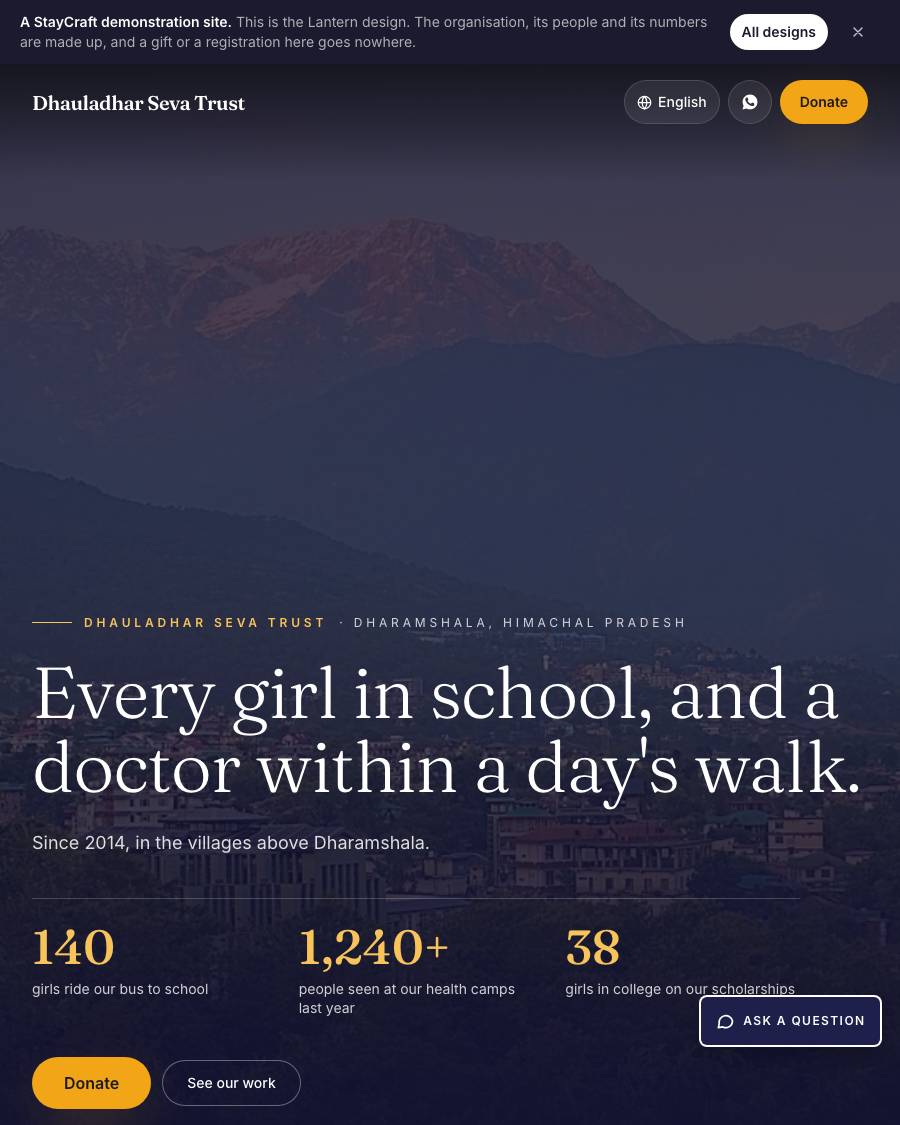
  • The first screen is the opening of a short film about your cause: your video playing behind it if you turn that on, else your photo, slowly pushing in. One line of your mission in a large serif, your name and town above it, three of your own numbers counting up, and a marigold Donate button. Deep ink indigo, marigold and soft paper white
  • Your sections, in the order you choose in Design: your story, Impact numbers (up to four, each a number, what it counts and a line), Programmes (each a photo, a name and a short line), Donate (your appeal and the ways to give), Events, Updates (your three latest), the photo gallery, Committee (name, role, term and photo, or their initials), Documents, Volunteer, where to find you and a Write to us form
  • Your screens Under Your website: Programmes, Committee and Documents. Drag to reorder; switch any one off the site.
  • Documents Are PDFs up to 20 MB with a title, a kind (registration certificate, 12A, 80G, CSR-1, FCRA, annual report, audited accounts) and a year. Anyone can download one you show; one you switch off cannot be opened from your site at all.
  • Volunteers Fill in their name, phone or email and how they can help. It arrives under Messages starting "Wants to volunteer", and you follow it up like any other message. On Growth and above it is the volunteer sign-up instead (below).
  • Your footer Says what you are registered as, from Settings › Registrations, and your NGO Darpan ID: only what you typed.
  • Motion That is calm and slow: sections rise into view, numbers count, a warm glow follows the scroll. Visitors who ask for less motion, and anyone who prints the page, see everything still. In 8 languages for visitors.
  • No photos yet? The first screen draws the hills at dusk and each programme a numbered plate, until you add your own.
  • Its own touches, as on every organisation design: the Ask a question button (always at the bottom right) and the Write to us form are styled the design's own way, and a small hand-drawn mark of the design's own (a lantern here, a cricket ball on Pavilion, a deodar on Deodar) sits between the sections and draws itself in as a visitor scrolls. What they ask and do stays the same
Notices, roles, Accounts and complaints 14
  • Members who asked for notices Active members who ticked "Send me the committee's notices" when they joined.
  • Donors who asked for updates: donors who ticked Send me your updates and appeals on the donate form. The box is off by default; a donor who did not tick it is never written to
  • Both, one email a person, or nobody: a notice for your website only
  • Before anything goes you see how many it reaches and who is left out (no email, unsubscribed). Send by email: every email has an unsubscribe link, and anyone who unsubscribes is never written to again. Send on WhatsApp: tap each person to open WhatsApp with the message written. A log shows who it went to
  • Show on the website, and Pin to the top: your notices page (/notices), and the notice board of a design that has one, newest first with pinned ones on top. Take one down at any time
  • The person gets a reference to quote and a page that shows where it stands
  • Members › Complaints (or Requests) lists them, newest first. Move each one Open → In progress → Done; the person is emailed each time. A note is for the committee only
  • A photo has its location and camera details removed, and is opened from your admin only
  • Done ones are cleared 12 months after they were last touched, like messages. Remove details clears one person's when they ask
  • Secretary Everything but your plan and the logins.
  • Treasurer Gifts and receipts, donors, the 10BD export, members' dues and payments, monthly pledges, and Accounts.
  • Event desk The Attendance screen only, to mark who came.
  • Volunteer lead Volunteers and their hours, and the events to read.
  • Book keeper (with SHG books): the self help groups' books only.
Your website: Pavilion, for a club 6
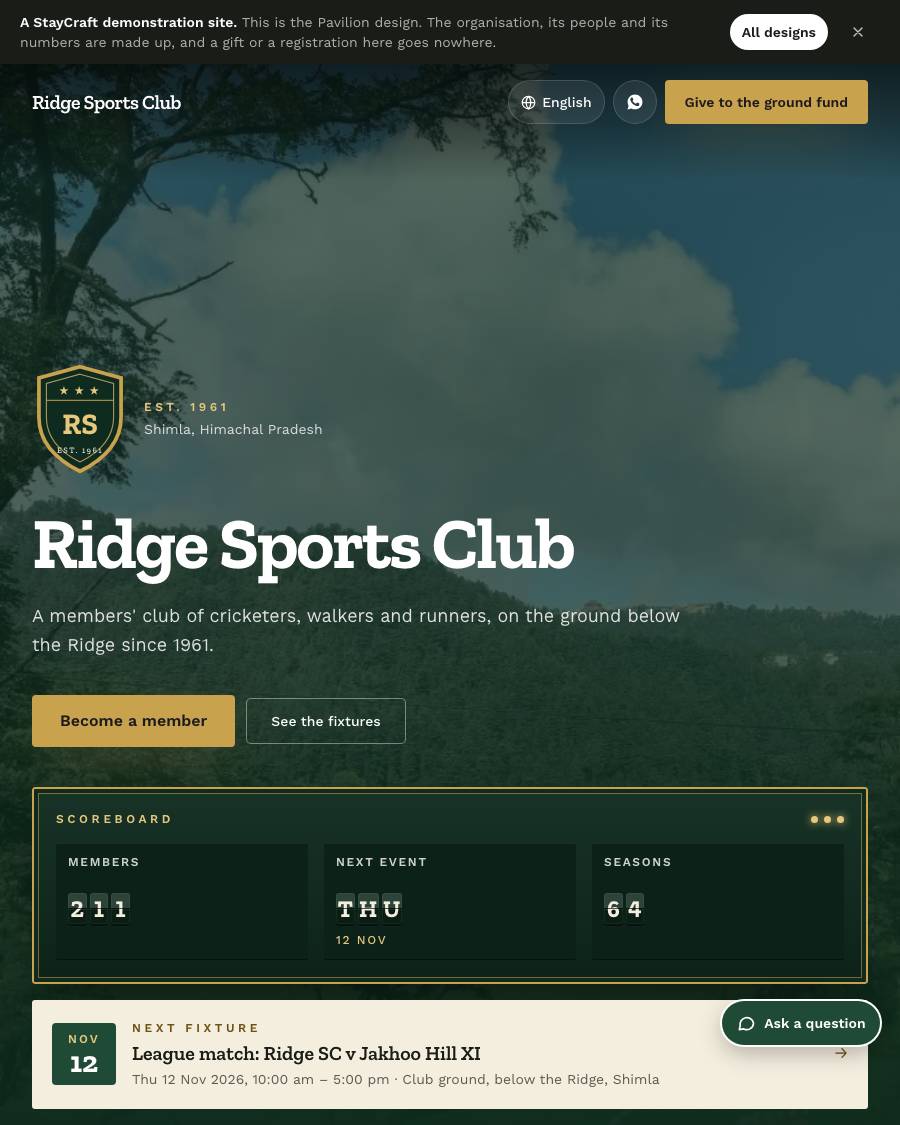
  • The first screen: your crest (your logo, or a shield with your initials and the year you were founded), your name, and a scoreboard whose tiles flip like a station board's: how many members you have, the day of your next event, and your own numbers. A tile with nothing true to show is left out: never "0 members". Under it, the next fixture, with a link to its page. On a laptop the scoreboard and the next fixture sit side by side in a band under your name
  • Fixtures Your next three events as team sheets (when, where, free or the ticket price) that slide in as they come into view.
  • Membership and notices: a Become a member button with your member count, your current appeal with how much is raised, and your latest notices with the pinned ones first, and a link to send a request. Each part shows only when you have it
  • Honours board Your past presidents (or captains, or champions), lettered in gold on a green board. You type the names in the section.
  • Your story, your numbers as a scorecard, your committee as brass nameplates, club news, your photo albums, the ground fund, your papers, where to find you and Write to the club with WhatsApp
  • Visitors who ask their phone for less motion see everything still; it prints cleanly
Your website: Courtyard, for a residents' welfare association 6
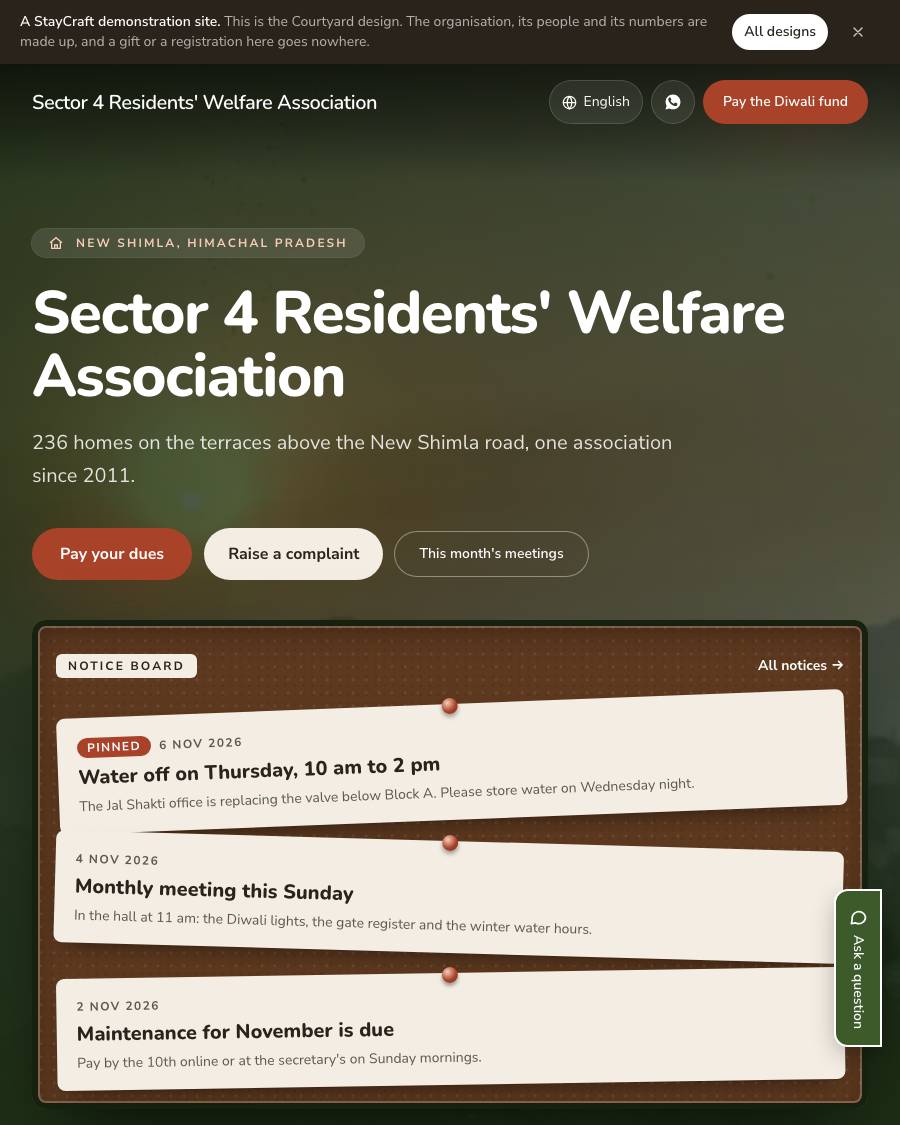
  • The first screen: your colony from above (your photograph, or a hillside of homes drawn until you add one), your name, and a notice board with your latest three notices pinned to it, the pinned ones first. They drop onto the board and settle with a little sway. Before you post notices, the board pins your latest three updates; with neither, there is no board. On a laptop the board runs across the page under your name, the notices side by side. Beside your name, Pay your dues (once you raise dues), Raise a complaint (once the complaints box is on) and This month's meetings
  • Dues status This period's dues, the day they fall due, the share of homes that have paid (only if you choose to show it) and a Pay button. Never a name or an amount per person. Shows only once dues are raised.
  • Meetings and events On a wall calendar open at the month, every event day ringed; last month's page turns as it comes into view. Beside it, the coming events with when, where and entry.
  • Useful numbers The gate, the plumber, the electrician, the water office, the secretary: you type them in the section, and each is called with one tap.
  • Your story, your numbers, what you look after, your committee, your minutes and accounts, your photo albums, the join form, the festival fund, where to find you and Write to the committee with WhatsApp
  • Visitors who ask their phone for less motion see everything still; it prints cleanly
Self help group: the group, members, meetings, savings and the cash book 7
  • The group. A self help group's own site has its one group, made for it. An NGO, a village organisation or a cluster federation turns the books on in Settings › Registrations ("We keep the books of self help groups"), adds each group under Groups (up to its plan's number), and switches the group in view; every screen shows only that group's books
  • Members Each with her number in the group, her name (and in Hindi), her role (member, president, secretary, treasurer), her nominee and the day she joined. A group usually has 10 to 20: outside that the screen reminds you, and never refuses. A member who leaves is marked Left; her books stay.
  • The meeting sheet One screen per meeting: the date, who came, who was away or on leave, each member's saving (the group's fixed amount filled in), an expense, a fine or cash taken to the bank, the loans asked for and decided, and the minutes in the group's own words. Saving it writes attendance, each member's savings and the cash book together. A meeting is corrected, never rewritten: the old entries stay, crossed out, beside the right ones, with the reason.
  • Savings ledger. Each member's savings line by line with her running total, and who is behind, the most owed first
  • Cash book Cash in hand and money in the bank, the opening balance from the paper book, money taken to or from the bank, and a reversal for a wrong line (never deleted). Month by month: at the start, in, out, and at the close.
  • Book keeper A login for the person who writes up the books: every self help group screen, and nothing of the organisation's own (no plan, logins, gifts or accounts). She adds no group and deletes no line.
  • On your website As totals only and only if you want: members, meetings held, savings together. Never a member's name or amount.
Self help group: loans, bank linkage, the passbook and the grading sheet 8
  • Loans to members Amount, purpose, interest a month (1% or 2%, or any rate), the number of instalments, monthly or at each weekly or fortnightly meeting. The schedule is worked out for you, and the formula is said in plain words: "₹10,000 at 1% a month, flat: ₹100 each time, ₹1,000 in all".
  • Flat or reducing Flat (interest on the whole loan each time) is the default, as most paper books keep it. Reducing charges interest only on what is still owed: the same part of the loan each time, or the same amount each time (EMI). Each instalment is rounded to the rupee, and the last takes the difference, so the totals match your book.
  • The schedule is yours Change any row to match the paper book; the loan parts must still add up to the loan.
  • Repayments at a meeting or by hand: interest first, then the loan. A part payment leaves the rest due. Paying extra shortens a flat loan or makes a reducing loan's instalments smaller. Close early, Write off, and an Overdue list. Penal interest is a group setting, off unless you turn it on
  • Bank loans and funds A cash credit limit (CCL) or a term loan: the sanction, each drawdown, each repayment with its interest, and whether it is regular. The revolving fund and community investment fund, and repaying a CIF.
  • Into the cash book by itself Every loan, repayment and bank movement is written into the group's cash book. No money moves through StayCraft: the books are a record of what the group handled.
  • Passbook Each member's savings, loans and repayments on an A5 page that looks like the paper passbook, in Hindi or English, to print or send her.
  • Grading sheet The figures a bank asks for when it grades the group: meetings held against meetings due, attendance, savings regularity, loans to members, loan repayment, books up to date, and the bank loan's standing, each explained in one line, ready to print.
Self help group plans, many groups, and selling what the group makes 5
  • SHG Books ₹1,200 a year: one group's books, its one-page website, one login for the book-keeper.
  • SHG Federation ₹20,000 a year: one login keeps the books of up to 25 groups. Pick a group, then its books. At the limit, Add a group says so; ask us on WhatsApp for more.
  • A page for each group On a federation's website, at /groups: its name in Hindi and English, its village, the year it began saving, its own words, its photo and its totals (saved together, lent to each other, members, meetings), only once the group is marked published. Never a member's name, phone or money.
  • What the group makes, sold Pickles, socks and shawls under Local crafts › Products, on the site with a basket. Buyers pay the group by UPI with a screenshot, or through the group's own Razorpay; you approve each order under Local crafts › Orders. This is the group's trade, kept apart from its books.
  • WhatsApp openers On an SHG site ask about the group's products, how to join a group and when the group meets.
Your website: Rangoli, for a self help group 6
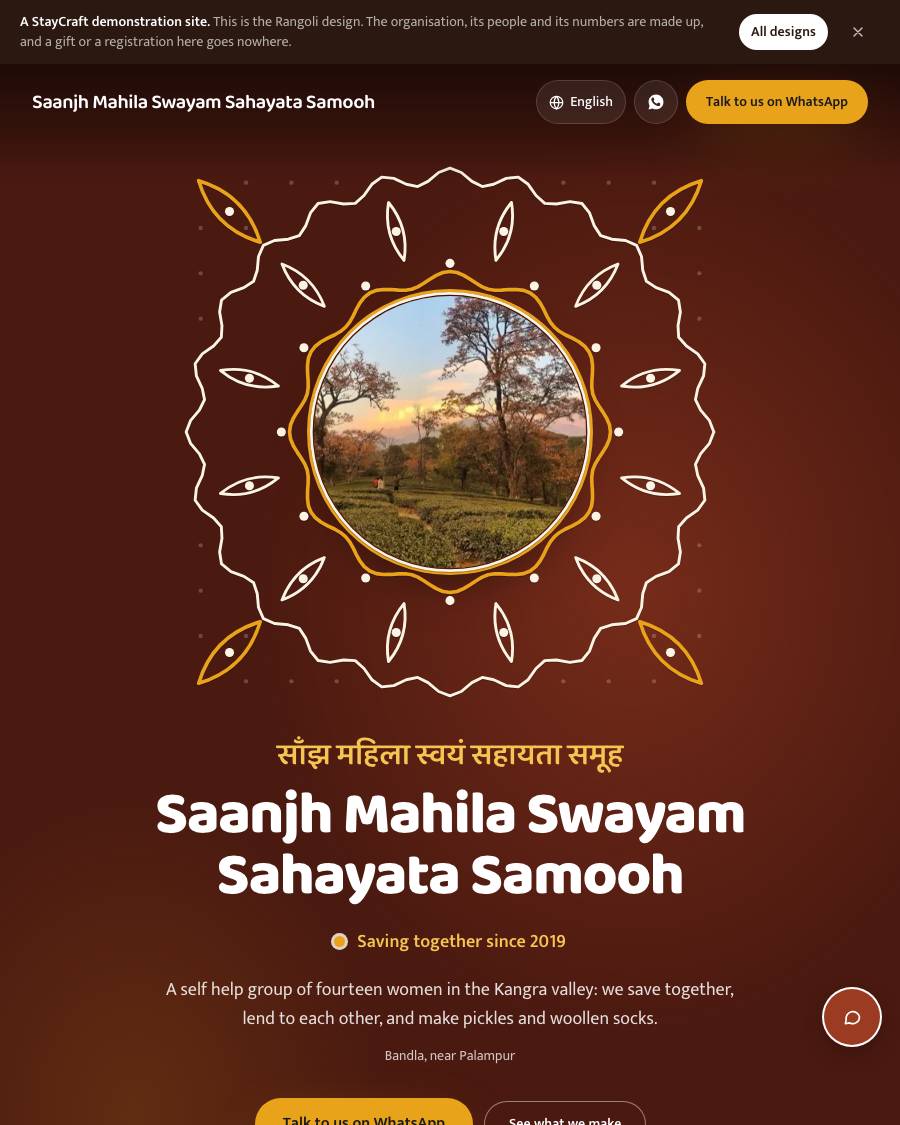
  • The first screen: your group's photo at the heart of a chalk kolam that draws itself, dot by dot and line by line, your name in Hindi above your English name, and Saving together since the year you began. Your group's profile fills them in when you keep your books here; otherwise you type them in the section
  • Savings together What your members have saved and lent each other, from your books, opening out from a turmeric centre like a rangoli. Group totals only, never a member's name or amount, and only if you have not hidden your figures.
  • Our meetings How many members you are and how many meetings you have held, with your own line about when and where you meet.
  • What we make Your products as a strip a visitor can order from, once you sell through your website.
  • Your story, what you make, your events, news, photographs, where to find you and Write to us with WhatsApp. No Donate button: your main button opens WhatsApp with your group
  • A figure with nothing true to show is left out: never "₹0 saved". Visitors who ask their phone for less motion see everything still; it prints cleanly
Your website: Monsoon, the premium design 5
  • The first screen: your photograph seen through a window in the rain. Drops run down the glass and bend the picture behind them; as a visitor scrolls, the rain eases off and your photograph sharpens. Your mission in tall capitals, and one coral Donate button
  • Your appeal under it: your featured campaign, what you have raised so far, your goal and the days left, with a rain gauge that fills like water rising. With nothing raised yet it shows your goal and "Be the first to give", never 0%; with no campaign, your mission and Donate alone
  • The appeal section: the campaign's story and what the money does, a tall rain gauge and Give to this appeal
  • Your mission, your programmes as panes of a window, your numbers counting up, how to give, your updates, your photo albums, your documents, where to find you and Write to us with WhatsApp
  • Phones that cannot draw the rain smoothly, and anyone who asks for less motion or saves data, see a still window instead, and it prints cleanly. Keep the first screen still shows the still window to everyone
Temples and religious trusts: the preset and its words 6
  • The WhatsApp button Asks in the faith's words: Ask about seva timings, Ask about prasad by post, Ask about darshan (a church: Mass timings, a service, a visit; a mosque: namaz timings, khidmat, a visit). In all eight languages.
  • Run by the state temple trust? A temple managed by the Commissioner or the Deputy Commissioner (the HP Hindu Public Religious Institutions and Charitable Endowments Act 1984) may sign up. It is reminded on its dashboard, in Settings and on the plan page that it may need the DC's approval before it takes money online. Nothing is blocked.
  • 80G for a temple (Basic and above): off until the trust saves its own 80G number and ticks that its CA has confirmed it covers these gifts. A temple notified under 80G(2)(b) gives 80G receipts only on gifts to its repair fund (a campaign it chooses), within the notification's date and cap, and the receipt names the notification. Every other gift gets a plain receipt
  • Watch live A section with the temple's YouTube stream or a video, played without YouTube's cookies until pressed. YouTube only.
  • Rules for visitors A section with what to wear, photographs, footwear and timings, each with an icon, and more lines of the temple's own.
  • A Hindu temple starts on the Deodar design, every other faith on Lantern
Temples: sevas, timings and prasad by post 18
  • Darshan hours for summer and for winter, each switched on by a date you set (1 March and 1 November unless you change them). One or two sittings a day
  • The daily aarti and pooja list: name, the name in Hindi or your script, the time and the kind
  • Special days A festival with its own hours and its own list, or a day you are closed (an eclipse) with the reason. No seva is offered on a closed day.
  • On your website: a today line ("Temple open · Sandhya aarti 6:30 pm"), and the Timings and Aarti schedule sections, the next aarti marked
  • Seva types: the offering, fixed or as the devotee wishes from a least amount (or free, such as a darshan pass); the days of the week; fixed times, or any time in the day; how many at each time; how far ahead; how much notice; days it is not offered (festival days); gotra asked or not; what to bring; a photo
  • A devotee offers a seva on your website: the day and time, their name, gotra (optional), the names it is offered for, how many will come, phone or email
  • They pay first, online through your own Razorpay or by UPI with a screenshot. Their place is held for 30 minutes while they pay; a screenshot keeps holding it until you approve it
  • A time never takes more than its places If the last place goes while somebody pays, you are told, to move them or return the money.
  • Once the money is in: a seva slip by email with the time and what to bring, and a receipt of its own (SEV/26-27/0001, a PDF with a QR anyone can check). Never a donation receipt, never 80G
  • Sevas: every slip, with its payment; approve a screenshot, record cash at the counter, cancel (the slip is kept)
  • Today's sevas: the pujari's list, today only, by time, each devotee's name and gotra in large type, a Done button, printable on A4
  • A Pujari login: Today's sevas and To post only, never the money
  • The Offer a seva section on your website: your sevas as cards with the next open time
  • A seva can offer prasad by post. The devotee gives an address in any country you post to
  • Postage: one line per country, a Rest of the world line, and countries marked not posted to. With neither, the form says prasad cannot go there
  • The postage is added to what the devotee pays first, and shown apart on the receipt
  • To post: the address and country; mark it posted with the tracking number, and the devotee is emailed
  • Cards from abroad work once international payments are switched on in your own Razorpay. Food sent abroad meets the customs rules of the country it goes to
Temples: hundi count, gifts in kind and annadan 8
  • Hundi counts (Basic and above). Each opening of a hundi is written down: the day, which hundi, who counted and who checked (two different people, both named), and anyone else present. Enter how many of each note (₹2,000 down to ₹10) and coin (₹20 down to ₹1): the total is worked out to the paisa and the count is confirmed only when it matches the total written on the signed sheet. A photo of the sheet can be kept with it, and the sheet printed for signing
  • Foreign money In a hundi is written down on its own (currency, amount, your own estimate in rupees), with the note that it may be a foreign contribution under FCRA and to ask your CA before banking it. It is never added to the rupee total, and reaches your accounts only once you mark it banked on your CA's advice, at the rupees credited.
  • Locked once confirmed. A mistake is fixed with Correct: a reversal of the count and a new count to confirm. The original stays on record; nothing is ever deleted. Mark a count banked with the day, the bank and the deposit slip number
  • Gifts in kind (Basic and above): a simple register, not stock. Gold and silver by weight in grams, cloth, grain and anything else by quantity, who gave it (or nobody named), and what became of it (kept, used, auctioned, given away). A giver can have a plain acknowledgement numbered INK/26-27/0001; goods earn no 80G, so it never says 80G. A rough value can be noted for your own record and is never counted as income. The register prints, with gold and silver totals.
  • Annadan or bhandara sponsorship (Growth and above): set what one costs (for the day, or per meal with the sponsor choosing how many), how many sponsors a date takes (one, or several), how far ahead and on which days of the week dates open, and the days you close (with the reason). Devotees choose a date from the calendar on your website, write who it is in memory of or for, and pay you directly, online through your own Razorpay or by UPI. Each sponsorship is a gift: the same numbered receipt, and 80G only where your temple's 80G allows it.
  • Paid first. A date is taken only once the money reaches you. If two sponsors pay for the last place at once, the first keeps it and you are shown the other to move to another date or refund. A sponsor's name shows on the calendar only if they tick that they agree. The Annadan calendar section shows the coming dates on your home page
  • Accounts (Plus and above): the hundi counts and seva offerings are income beside gifts and members' fees, month by month, against your expenses. Gifts in kind are noted apart, never as money.
  • Your treasurer Keeps the hundi counts, gifts in kind, annadan and the accounts; your secretary the annadan. The pujari sees none of them.
Your website: Deodar, for a temple 8
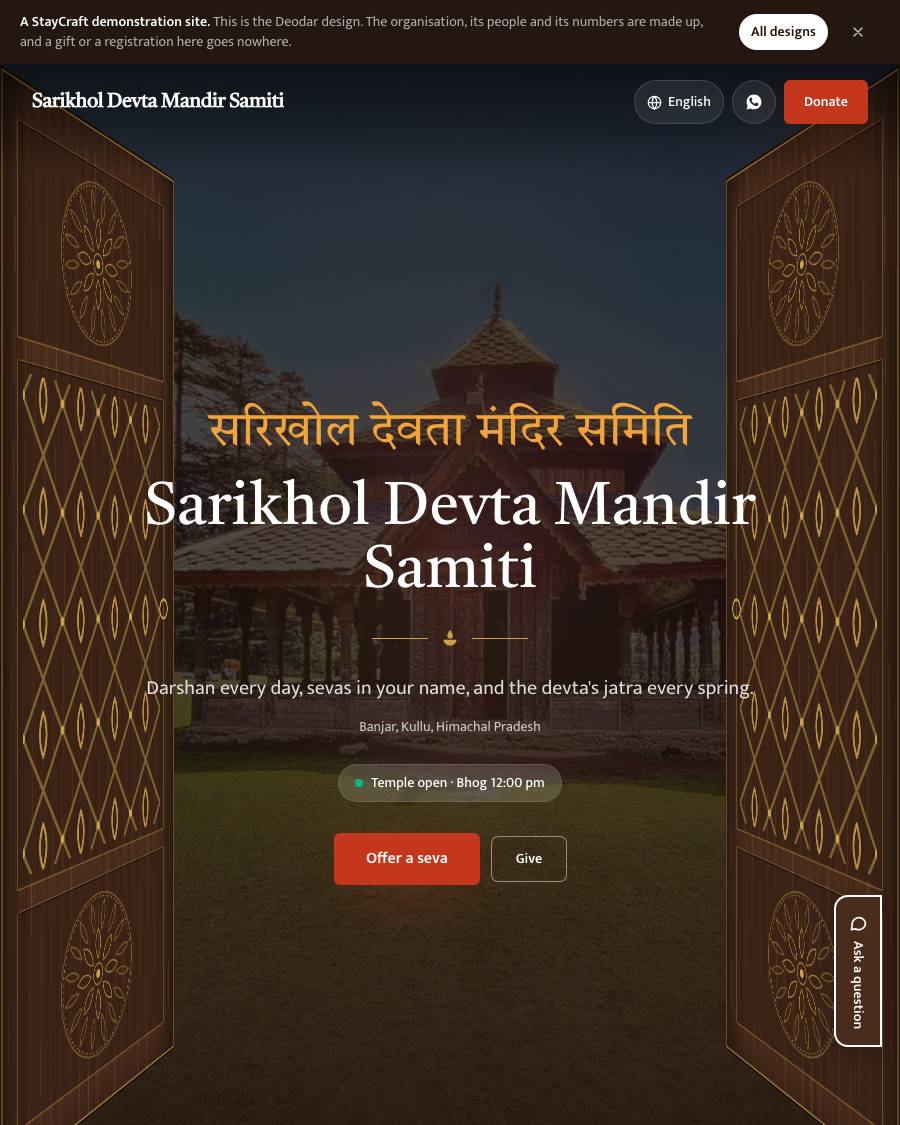
  • The first screen: two carved deodar doors swing open on your temple at first light. Your name in Hindi above your English name, today's line ("Temple open · Sandhya aarti 6:30 pm"), and two buttons: Offer a seva and Give. On a festival day a string of marigolds hangs across the top
  • The bells: the day's aarti and pooja run down the page as brass bells on a rope, each swaying as it comes into view, with a diya burning beside the next one due and what is over dimmed
  • Timings Today's darshan hours on a carved panel, the week's below, summer or winter, a closed day with its reason.
  • Sevas: each with its offering (₹1,100; "as you wish, from ₹501") and its next open time, and Offer a seva
  • Next festival Your next jatra, festival or bhandara from your events, with its dates and place.
  • Annadan The price of a day's meal, the coming dates open or sponsored, and the sponsor button (Growth and above).
  • Live darshan, rules for visitors, your history, how to give, your photo albums in carved frames, your committee and documents, How to reach (the road, the nearest bus stand and the walk up), the map and Write to us
  • Every section with nothing to show is left out: never "₹0". Anyone who asks for less motion sees the doors open and the bells still; it prints cleanly. Keep the doors open shows them open to everyone

Plans and prices

Priced per year, no commission

We agree the plan with you before anything goes live. No card up front: you pay by UPI or bank transfer, and every booking's money is yours.

Website ₹9,000/yr

  • Basic

₹750 a month, billed yearly

Growth ₹15,000/yr

Everything in Basic, and

  • Plus

₹1,250 a month, billed yearly

Plus ₹18,000/yr

Your own domain, 8 languages and your accounts

₹1,500 a month, billed yearly

Pro ₹30,000/yr

Alerts on your phone (a new gift, a new event registration, a new message). 20 logins and 25 GB. The premium Monsoon design. The AI helper: visitors type a question on your website and it answers from your own pages.

Everything in Plus, and

  • For a self help group: two plans of their own
  • Outside the ladder above
  • Paid by the year only

₹2,500 a month, billed yearly

SHG Books ₹1,200/yr

The group's books: members, meetings with attendance, savings, the cash book, internal loans with schedules, bank loans, a passbook for each member and the grading sheet. A one-page website on the Rangoli design, 1 login for the book-keeper, 512 MB. Sell what the group makes in a basket on its site. No donations.

₹100 a month, billed yearly

SHG Federation ₹20,000/yr

The books of up to 25 groups under one login

₹1,667 a month, billed yearly

Compare every plan, line by line

Designs

6 designs made for this

Pick one when you start, and switch whenever you like. Changing the design never touches your updates, your photos or your receipts.

NGOs & communities

Tell us about your organisation

What you do, where, and how gifts reach you today. We will say which plan fits and what it costs.

WhatsApp us